Introducing NetworkSpectator#
I’m excited to share NetworkSpectator - a lightweight, completely free and open-source Swift library that brings network monitoring and intercepting capabilities to your iOS and macOS apps.
Why I Built This#
After years of iOS development, I’ve watched teams repeatedly struggle with the same challenges:
- Debugging API responses in real-time without external tools
- Testing edge cases that require waiting for backend deployments
- Sharing network logs effectively across development, QA, and backend teams
- Empowering testers to validate business logic without developer intervention
This framework addresses these challenges. It provides a comprehensive view of all HTTP traffic with full request and response details. Logs can be exported in formats (CSV, plain text, Postman Collections) for seamless collaboration. The mocking system eliminates the wait for backend deployments, enabling offline development. What sets it apart: mocks can be created both programmatically and through UI, allowing QA engineers to independently test complex scenarios without touching code.
Features#
Real-Time Network Monitoring#
Watch every HTTP request and response as it happens:
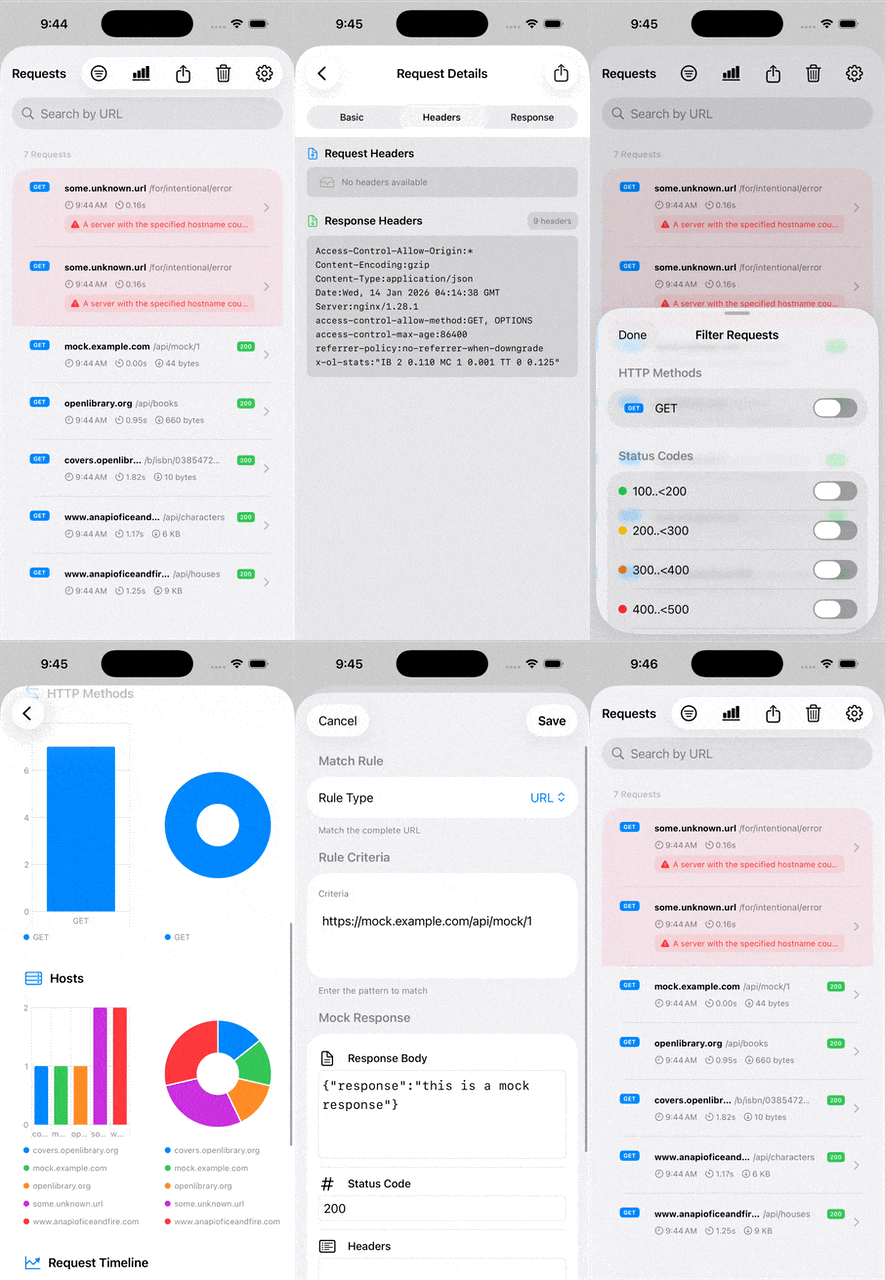
- Complete request/response details (URL, method, headers, body)
- Response times and status codes
- Beautiful SwiftUI interface for both iOS and macOS
- Analytics dashboard with visual charts for HTTP methods, status codes, and host distribution
Smart Filtering & Search#
Find what you need instantly:
- Filter by HTTP method (GET, POST, PUT, DELETE, etc.)
- Filter by status code (2xx, 3xx, 4xx, 5xx)
- Search requests by URL
- Clean interface that works seamlessly on both platforms
Export in Multiple Formats#
Share logs however your team prefers:
- CSV - Good for spreadsheet analysis
- Plain Text - Simple format for quick sharing
- Postman Collection - Import directly into Postman for API testing
Mocking System#
Test any scenario without backend changes:
Programmatic Mocking - Add mocks in code for reliable unit tests
UI-Based Mocking - Let QA testers create and edit mocks directly from the UI, without Xcode or developer intervention. This means:
- Testers can validate business logic independently
- Faster iteration on edge cases
- Perfect for offline development
Skip Logging for Sensitive Requests#
Keep logs clean and secure:
- Define skip rules programmatically or via UI
- Exclude sensitive or irrelevant requests
- Edit rules on the fly without code changes
Built with Modern Swift#
Being passionate about modern Swift, I built NetworkSpectator using the latest Apple technologies:
- SwiftUI for native, declarative UI on iOS and macOS
- Structured Concurrency (async/await) for safe networking code
- Swift 6
- Tested using Apple’s new Testing framework
- No dependencies - pure, maintainable Swift code
NetworkSpectator in action#
NetworkSpectator UI Walkthrough on iOS:
Why Choose NetworkSpectator?#
🟢 Free & Open Source#
The full source code is available under the MIT license.
🟢 No External Dependencies#
Pure Swift. No third-party SDKs to manage.
🟢 Works with SwiftUI and UIKit/AppKit#
Whether you’re building modern SwiftUI apps or maintaining UIKit/AppKit projects, NetworkSpectator integrates seamlessly.
🟢 Empowers Your Entire Team#
Not just for developers:
- QA engineers can inspect requests and create mocks via UI
- Product managers can see actual API responses
- Backend teams can reproduce issues with exported logs
For Developers#
- Debug API integration issues in real-time
- Test scenarios with mocks
- Share detailed logs with backend teams
- Develop features without backend deployment
- Write unit tests for services using mocks without actually making a network request
For QA Engineers#
- Create test scenarios independently via UI mocking
- Export logs as evidence for bug reports
- Validate business logic across different API responses
- No Xcode or coding knowledge required
Get Started Today#
Installation#
Add NetworkSpectator via Swift Package Manager:
dependencies: [
    .package(url: "https://github.com/pankajbawane/NetworkSpectator.git", branch: "main")
]
One-Line Setup#
Start HTTP monitoring with just one line.
import NetworkSpectator

#if DEBUG
    NetworkSpectator.start()
#endif
Example Project#
Check out the example app to see it in action: NetworkSpectatorExample
Links#
- GitHub Repository: NetworkSpectator
- Example App: NetworkSpectatorExample
What’s Next?#
I’m actively developing NetworkSpectator. If you find it useful, consider:
- ⭐ Starring the repo on GitHub
- 📣 Sharing it with fellow developers
- 🐛 Reporting issues or suggesting features
Happy coding! 🚀